

In the field of quality control, Metal Needle Inspectors play a crucial role, especially in industries such as textiles, food, and toys. These machines are designed to detect the presence of metal needles or other ferrous contaminants in products, ensuring the safety and quality of the end - user items. As a supplier of Metal Needle Inspectors, I understand the importance of keeping these machines up - to - date through software upgrades. In this blog, I will discuss the software upgrade methods of a Metal Needle Inspector.
Why Software Upgrades are Necessary for Metal Needle Inspectors
Before delving into the upgrade methods, it's essential to understand why software upgrades are necessary. Firstly, technology is constantly evolving. New algorithms and detection techniques are being developed to improve the accuracy and sensitivity of Metal Needle Inspectors. Upgrading the software allows the machine to take advantage of these advancements, enhancing its performance in detecting even the smallest metal contaminants.
Secondly, software upgrades can fix bugs and glitches that may be present in the existing system. These issues could potentially lead to false alarms or missed detections, which can have serious consequences for the quality control process. By upgrading the software, we can ensure the reliability and stability of the Metal Needle Inspector.
Thirdly, regulatory requirements may change over time. Industries are often subject to strict safety and quality standards, and the software of Metal Needle Inspectors needs to be updated to comply with these new regulations.
Software Upgrade Methods
1. USB Flash Drive Upgrade
One of the most common and straightforward methods of upgrading the software of a Metal Needle Inspector is through a USB flash drive. Here are the steps involved:
- Preparation: First, obtain the latest software version from the manufacturer. This can usually be downloaded from the official website. Save the software file on a clean and formatted USB flash drive. Make sure the USB flash drive has enough storage space to hold the software file.
- Installation: Power on the Metal Needle Inspector and insert the USB flash drive into the designated USB port on the machine. Navigate to the software upgrade option in the machine's menu. The system will detect the software file on the USB flash drive and prompt you to start the upgrade process. Follow the on - screen instructions carefully. The upgrade process may take several minutes, during which the machine will restart multiple times. Do not remove the USB flash drive or power off the machine during this period.
- Verification: After the upgrade is complete, remove the USB flash drive. Run a series of test detections to verify that the software upgrade was successful. Check for any error messages or abnormal behavior during the testing process.
2. Network Upgrade
With the increasing connectivity of industrial equipment, network - based software upgrades have become more popular. Here's how it works:

- Network Configuration: Ensure that the Metal Needle Inspector is connected to a stable local area network (LAN) or a wide - area network (WAN). The machine should have a valid IP address and be able to communicate with the network. In some cases, you may need to configure the network settings manually through the machine's menu.
- Remote Upgrade: The manufacturer can provide a secure remote upgrade service. Using specialized software and protocols, the manufacturer can push the latest software version to the Metal Needle Inspector over the network. The machine will receive the software package and start the upgrade process automatically. This method is convenient as it eliminates the need for physical media such as USB flash drives. However, it requires a reliable network connection and proper security measures to prevent unauthorized access.
- Monitoring and Troubleshooting: During the network upgrade, the manufacturer can monitor the upgrade process remotely. If any issues occur, they can provide real - time support and troubleshooting. For example, if the upgrade fails due to a network interruption, the manufacturer can resume the process or provide alternative solutions.
3. Manufacturer - Assisted Upgrade
In some cases, especially for more complex or high - end Metal Needle Inspectors, the manufacturer may offer on - site upgrade services.
- Scheduling: Contact the manufacturer to schedule an upgrade service. Provide them with detailed information about your Metal Needle Inspector, including the model number, software version, and any specific requirements. The manufacturer will send a technician to your site at a convenient time.
- On - Site Upgrade: The technician will bring the necessary tools and software to perform the upgrade. They will first back up the existing data on the machine to prevent any data loss. Then, they will install the latest software version and perform a series of tests to ensure the proper functioning of the machine.
- Training and Support: After the upgrade, the technician can provide training to your staff on how to use the new features of the software. They can also offer ongoing support and maintenance services to ensure the long - term performance of the Metal Needle Inspector.
Considerations during Software Upgrades
- Compatibility: Before upgrading the software, make sure that the new software version is compatible with the hardware of your Metal Needle Inspector. Incompatible software can cause malfunctions or damage to the machine.
- Data Backup: Always back up any important data stored on the machine, such as detection records and user - defined settings. This can prevent data loss in case something goes wrong during the upgrade process.
- Safety Precautions: Follow all safety guidelines provided by the manufacturer during the upgrade process. This includes proper grounding of the machine, wearing appropriate personal protective equipment, and avoiding any contact with live electrical components.
Our Product Range
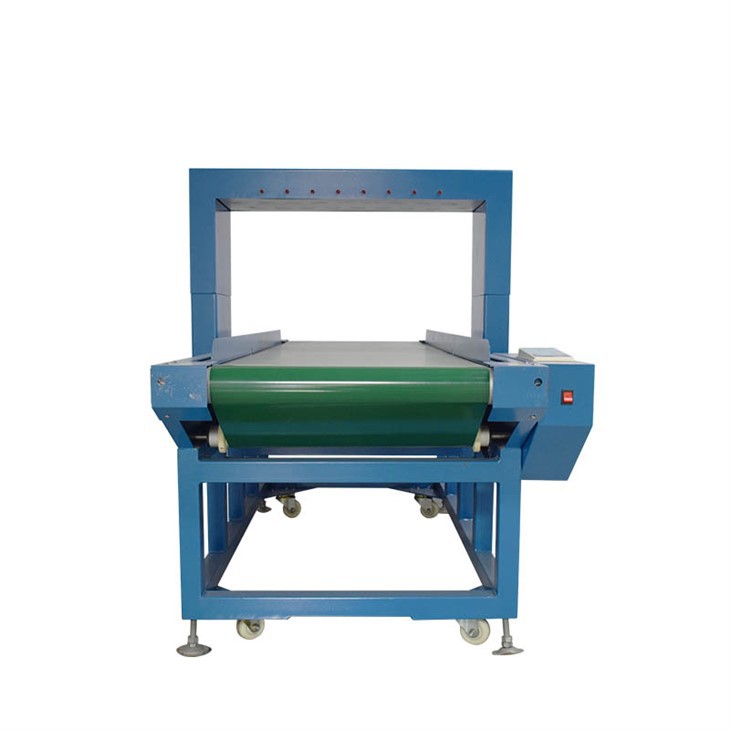
As a leading supplier of Metal Needle Inspectors, we offer a wide range of products to meet the diverse needs of our customers. Our Long Strip Needle Inspection Machine is specifically designed for inspecting long - strip products, providing high - precision detection. The Double Probe Needle Detector offers enhanced detection capabilities with its dual - probe design, increasing the reliability of metal needle detection. And our High Gantry Needle Detector is suitable for inspecting large - sized products, with a high - clearance gantry for easy passage of bulky items.
Conclusion
Software upgrades are an essential part of maintaining the performance and compliance of Metal Needle Inspectors. Whether through USB flash drive upgrades, network - based upgrades, or manufacturer - assisted upgrades, it's important to choose the method that best suits your needs and ensure that the process is carried out correctly. As a supplier, we are committed to providing high - quality Metal Needle Inspectors and comprehensive software upgrade services. If you are interested in our products or need more information about software upgrades, please feel free to contact us for procurement and negotiation.
References
- "Industrial Metal Detection Handbook", Published by XYZ Publishing
- Technical documents provided by Metal Needle Inspector manufacturers